
Frequently Asked Questions (FAQ)
Your Answers Await!
Got questions about Practice Sight Reading? Explore our comprehensive FAQ section to find answers to common inquiries. If your question isn't listed, don't hesitate to contact us directly for personalized assistance.
Rhythm Questions
All rhythm levels are included in the free and deluxe versions. In the delue version you have the additional option to create your own level. In the app you can see all of the levels if you have the deluxe version and navigate to the "Custom Level" tab.
What rhythms included in the duple levels?
Level 1:


Level 2:


Level 3:


Level 4:


Level 5:


What rhythms included in the triple levels?
Level 1:


Level 2:


Level 3:


Level 4:


How do I create custom levels?
Unlock the power of targeted practice with custom levels tailored to specific rhythms of your choice. Maximize your progress and hone your sight reading skills effectively.
Step-by-Step Guide:
- Upgrade to Deluxe: Ensure you have the Deluxe version to access the custom level feature.
- Access Settings: Click on the settings icon (gear icon) in the app interface.
- Choose Music Settings: Under 'Music Settings,' select 'Custom' level from the options.
- Navigate to Custom Level Tab: Head to the 'Custom Level' tab to begin creating your personalized exercises.
- Select Rhythms: Choose the specific rhythms you want to practice from the available options.
- Level Selection: Click on the level buttons located on the top right to select beats from that level.
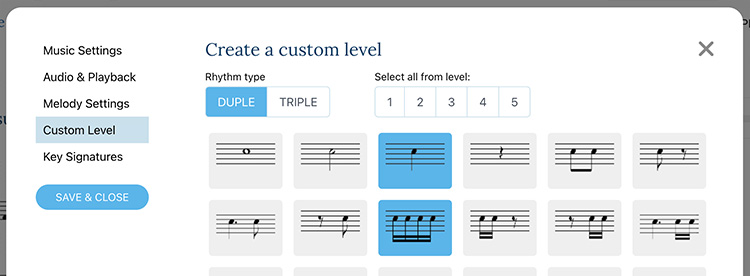
Clicking on the level buttons on the top right will select the beats from that level.
Instrument and Audio questions
The audio player is the same for both the free and the deluxe versions but if you experince issues, look at these questions.
When I play along the note pitches are incorrect
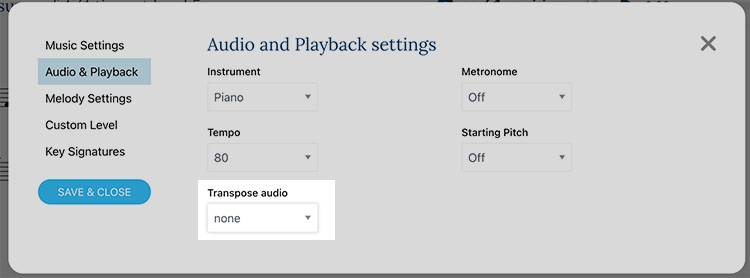
If you encounter audio playback issues, it may be due to a transposing error. The audio files are in the key of C, suitable for instruments like flute and piano. However, instruments such as clarinets, saxophones, trumpets, and others require audio transposition. Adjust the transposition in the settings menu for seamless playback.
You can change the transposition in the settings menu:
Can I practice with Piano or with multiple staffs/staves?
At present, our music generation is entirely random, and utilizing different staves may result in less optimal audio. However, we're actively developing a newer version of the music engine that will be more deterministic, offering exciting possibilities. If this piques your interest, please get in touch, and we'll keep you updated on its availability.
Sign up and stay informed about our innovative music engine updates!
Other Questions
If you have any additional questions, feel free to get in touch!
Why do I have to sign in?
In 2023, PracticeSightReading underwent an exciting makeover with a fresh design and interface. As part of this upgrade, users now require an account to access practice sessions. Don't worry, rhythm practice remains free for all users! For those seeking to explore melodies and show support, consider upgrading to our deluxe plan. Discover new musical horizons with PracticeSightReading Deluxe!
Minimum Requirements
PracticeSightReading.com works in all modern browsers. JavaScript and Cookies must be turned on to save settings and log in.
Infinite Loop Error or Overflow limit
Avoid Infinite Loop Errors or Overflow Limits while creating custom levels by selecting the correct notes. For instance, in 2/4 time, having only whole notes selected triggers the error. Choose appropriate notes to resolve the issue seamlessly and enhance your sight reading experience.
Ready to Master Sight Reading?
Start Your 7-Day Free Trial Now and Unleash Your Musical Potential Today!